Your usual week,
already remembered.
Save a client’s regular shifts and agreed rates once. Bring them into your next invoice, then change anything that’s different.
 FairbillGet Fairbill
 FOR NDIS PROVIDERS
Less paperwork.
More time back.
Create, send and track your NDIS invoices. All from your iPhone.
30 days free. No card. No sign-up.
EMAIL DEMONSTRATION
Real app recording with sample details. Screens may differ by app version. Final email screen is a demonstration; no email is sent.
After you send using Mail, Fairbill asks whether to mark the invoice as sent. This preview stops at the prepared email. No email account or delivery is simulated in the app.
No account or card to start
Log shifts offline
Records stay on your iPhone unless you turn on web access
A SMALL APP FOR A BIG PART OF YOUR WEEK
One place for your clients, your shifts and the money you’re waiting on.
Save a client’s regular shifts and agreed rates once. Bring them into your next invoice, then change anything that’s different.
See your shifts, travel and total together. Review the recipient and invoice details, then prepare your PDF and email.
Share your invoice as a PDF. When the money lands, mark it paid and send a receipt. Track what’s sent and owed, then export your records when tax time comes around.
TAKE A LOOK INSIDE
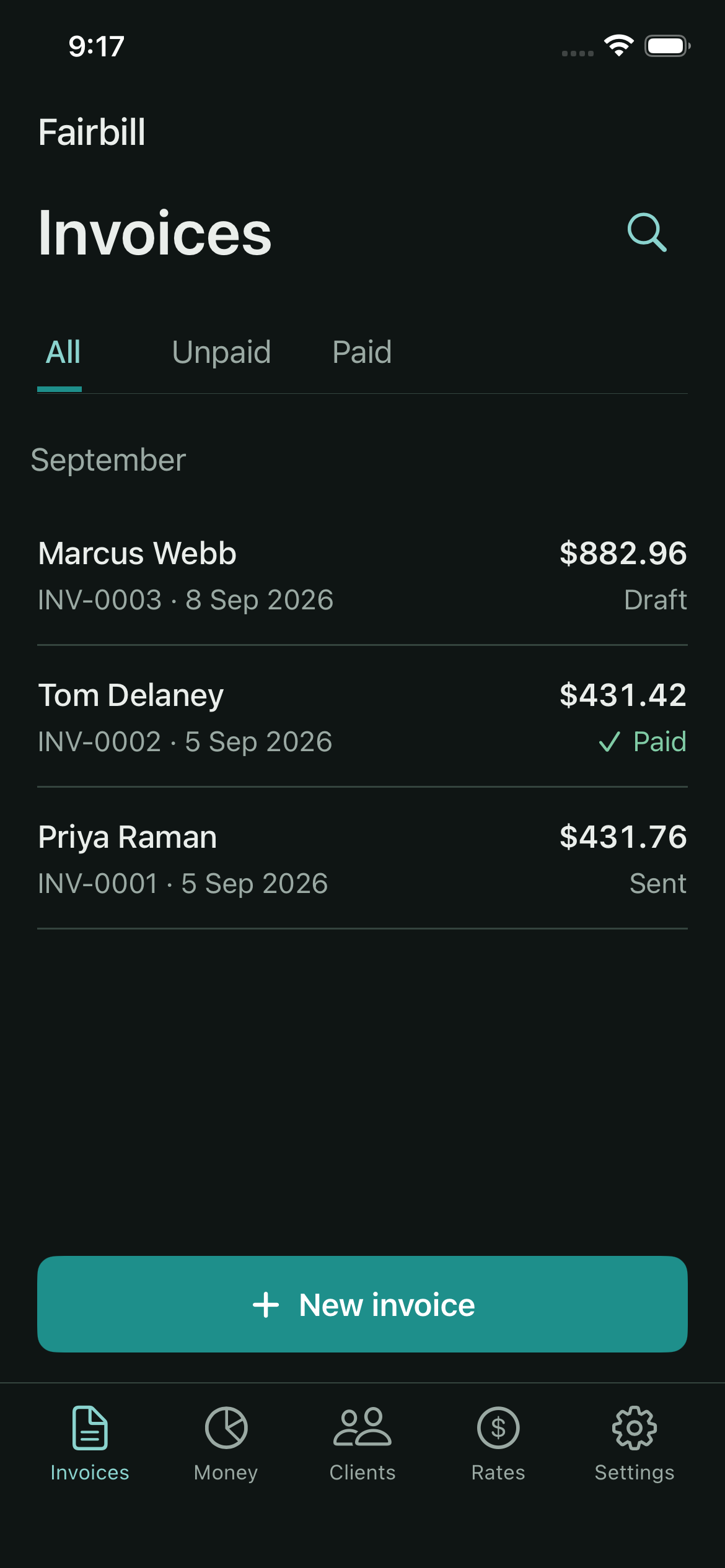
Your invoices should be easy to find and easy to read, even at the end of a long day.
App screens shown with sample client details.
OPTIONAL WEB ACCESS
Create invoices on your computer with your usual shifts, agreed rates and travel. Check the details, download the PDF and record payments, with changes synced to your iPhone.
Prepare the email on your computer, attach your downloaded PDF and send it from your email app.
Open Fairbill webRequires Fairbill 1.1 or later, with Web access enabled in Settings.
Web access stores an optional online copy of your records. The online copy is kept in Cloudflare’s Australian region; the privacy policy has the fine print. How your information is handled.
SIMPLE PRICING
Your first 30 days are free, with unlimited invoices and clients. No card and no account to set up.
After your free month. Billed monthly.
Try Fairbill freeSubscribe in the app. Manage or cancel through Apple.
Included from day one
If you don’t subscribe, existing invoices stay viewable, sendable and exportable.
Fairbill is built for NDIS providers who want to manage invoicing on an iPhone. It handles plan-managed, self-managed and agency-managed participants, and subcontracting work you invoice to another provider. Keep clients, supports, invoice PDFs, payments and receipts together in one app.
No account or card is needed to get started on iPhone. Download the app and try it for 30 days. Optional web access creates a connection you control from your phone. If you choose to continue with Pro, the subscription is purchased through your Apple Account.
Fairbill prepares invoices and records. It does not lodge claims with the NDIA. Plan-managed invoices go to the plan manager; self-managed invoices go to the participant or their nominee. Agency-managed claims are submitted through the relevant NDIS provider portal.
Yes. Save agreed rates for a client and Fairbill uses them on future invoices. How price limits apply depends on the participant’s funding arrangements. Review the invoice against your service agreement before sending.
No. When you add a client, tap Fill this in from an invoice and choose a PDF or photo of an invoice you’ve already sent them. Fairbill reads the name, NDIS number, item codes, rates and usual supports and fills the form in for you to check. This happens on your phone; the file isn’t uploaded anywhere.
Yes. For subcontracting, the hiring provider is the one you bill, at the rate you agreed with them. For self-managed participants, the invoice goes to the participant or their nominee. In both cases you can leave NDIS item codes off and use your own description of the support. Whether GST applies to your subcontract work depends on your arrangement, so check with your accountant.
Your records are stored on your iPhone. If you turn on the optional web access, Fairbill also keeps an online copy and syncs changes with computers you approve. The online copy is kept in Cloudflare’s Australian region; the privacy policy has the fine print. Keep an independent backup from Settings. You choose when to share invoices or export files. Optional shift descriptions use on-device Apple Intelligence; address suggestions use Apple Maps. Read the privacy policy.
Continue with Fairbill Pro for A$24.99 a month or A$199.99 a year. If you don’t subscribe, records you’ve already created stay viewable, sendable and exportable.
Yes. Export invoice records as CSV files and a financial-year PDF summary from the Money tab. Fairbill helps keep records; your tax agent can advise on your circumstances.
MADE IN AUSTRALIA BY A REAL NDIS PROVIDER
I’m Blake, the person building Fairbill. If something feels confusing or an invoice doesn’t look right, I want to hear about it. Your feedback helps me make the app better.
hello@fairbill.com.auLook up a standard support worker price limit by day and region.
Level 1 standard support
2026–27 schedule · effective 1 July 2026
Hourly price limit
Weekday daytime · National
A price limit is a maximum, not a required rate. Your agreed rate can be lower. Check the official schedule and your service agreement. General information only.
YOUR NEXT INVOICE STARTS HERE
Try everything free for 30 days.